The first time I called the Claude API from my own code, I built a simple Q&A loop. Ask a question, get an answer, ask a follow-up based on the first one.
Second question: “Tell me more about that.”
Claude had absolutely no idea what “that” was.
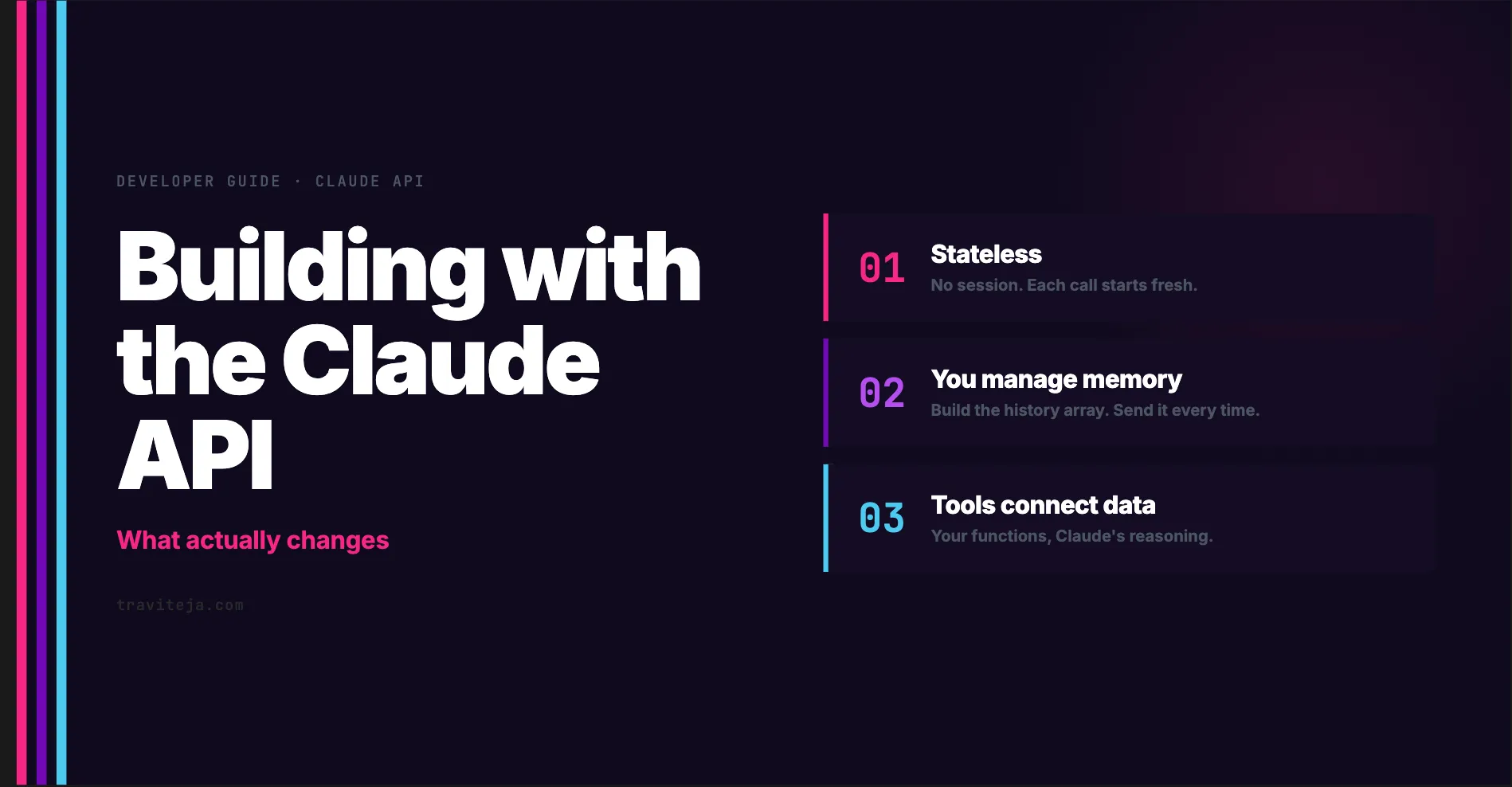
I’d assumed the API kept some kind of session open — a server-side conversation object I could keep adding messages to. It doesn’t. There’s no session. There’s no memory. The “conversation” you see in claude.ai is an illusion the client creates by resending the entire message history on every single request.
That one realization changed how I thought about everything. Once you see the API as a stateless function — give it context, get back a response — the design decisions make sense. Here’s what I wish someone had explained before I started building.
What you’re actually calling
Three things are required for a Claude API request: an API key, a model name, and a message.
import anthropic

client = anthropic.Anthropic(api_key="your-key")

response = client.messages.create(
    model="claude-sonnet-4-6",
    max_tokens=1024,
    messages=[{"role": "user", "content": "Explain embeddings in one paragraph."}]
)

print(response.content[0].text)
That’s the whole thing. The API key should live on your server, not in client-side code — embedding it in a browser app or mobile app means anyone can extract and abuse it.
There’s one detail about how Claude processes text worth knowing: it doesn’t read words, it reads integers. Your message gets broken into tokens — usually whole words or word-fragments — each converted to a number. When Claude responds, it predicts one token at a time, appending each to the sequence, until it hits a stopping point or your max_tokens limit. Roughly 4 characters per token, 1.3 tokens per English word. That’s also how you’re billed — so max_tokens should always be set explicitly in production.
You are the memory manager
The biggest mental shift when building with the API: there is no session. There is no conversation ID. If you want Claude to know what happened two messages ago, you resend those two messages on every call.
The messages array in your request is just that — an array your code maintains and passes in full every time.
history = []

def chat(user_message):
    history.append({"role": "user", "content": user_message})

    response = client.messages.create(
        model="claude-sonnet-4-6",
        max_tokens=1024,
        messages=history  # full history, every call
    )

    reply = response.content[0].text
    history.append({"role": "assistant", "content": reply})
    return reply
This works fine for short conversations. For long ones, costs compound — every token in that history array is billed on every call, including early turns that stopped being relevant twenty messages ago. Apps like claude.ai handle this by summarizing older messages or quietly dropping them past a threshold. You’ll eventually need to do the same.
Shaping how it responds
Three settings change the character of responses without changing what you ask.
A system prompt sets ground rules before the conversation starts. This is where you define Claude’s role, constraints, and project-specific context — anything that applies to every message in the session. Put it in the system field, not the first user message, because user messages get buried as the conversation grows.
response = client.messages.create(
    model="claude-sonnet-4-6",
    max_tokens=1024,
    system="You are a senior Python data engineer. Be concise, use code examples, and flag performance issues explicitly.",
    messages=[{"role": "user", "content": "How should I handle schema drift in a batch pipeline?"}]
)
Temperature controls output variation. Low values (0–0.3) make responses more deterministic — right for code generation and factual work where you want the same answer each time. Higher values (0.7–1.0) introduce variety — useful for brainstorming or creative work where the first answer isn’t necessarily the best one.
Streaming sends tokens back as they’re generated instead of waiting for the full response. The difference in perceived responsiveness is dramatic — users watching a blank screen for 10 seconds versus seeing words appear immediately. If you’re building anything with a UI, stream by default.
with client.messages.stream(
    model="claude-sonnet-4-6",
    max_tokens=1024,
    messages=[{"role": "user", "content": "Walk me through the architecture."}]
) as stream:
    for text in stream.text_stream():
        print(text, end="", flush=True)
Writing prompts that hold up under real traffic
Anyone can write a prompt that works once. What’s harder is writing one that works reliably across the range of things real users actually type.
The failure mode I see most: test against one or two happy-path inputs, ship the prompt, then get surprised when edge cases break in production. Real users send ambiguous requests, multi-part questions, inputs in other languages, and things the developer never imagined during testing.
The fix is treating prompt development like software development. Build a small set of realistic sample inputs — including tricky cases — and score Claude’s outputs against expected results. The scorer can be as simple as checking whether the output parses as valid JSON, or as involved as a second Claude call asked to judge quality on a rubric. The point is you have a number. When you change the prompt, you can tell objectively whether it improved.
A few prompting habits that consistently improve results:
Lead with the instruction. State the task first, then add context. “Summarize this document in three bullets” beats a paragraph of setup that eventually arrives at “…so can you summarize it?”
Be specific about the output. Describe exactly what you want back. “Return: a self-contained Python function, no import statements, with inline type hints” eliminates an entire class of non-answers.
Structure mixed-content prompts. When a prompt includes instructions, a document, and examples, wrap each section in labeled tags so Claude can tell them apart. Once prompts get long, structure matters more than you’d expect.
Show an example. A single concrete input→output example is often more effective than three paragraphs of specification. Two examples is better. Beyond that, diminishing returns.
Tools: giving Claude access to the real world
By itself, Claude only knows what it learned during training — no live data, no access to your database, no awareness of today’s date. Tools fix this.
A tool is a function you write and describe to Claude in a structured format. When Claude decides it needs that function to answer a question, it asks to call it. Your code executes it, and you send the result back. Claude incorporates the real data into its answer.
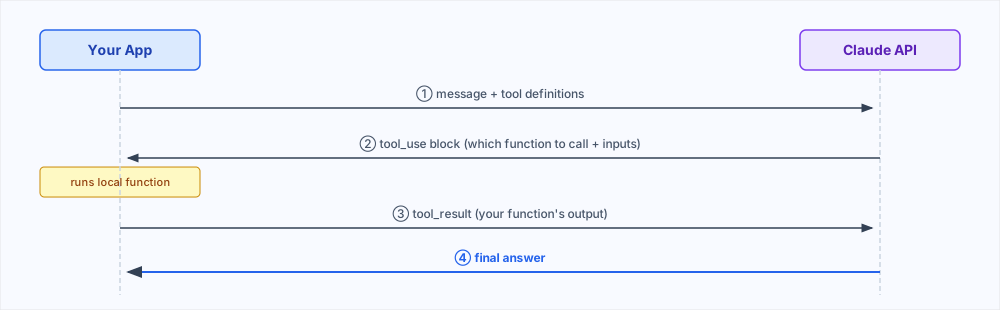
tools = [{
    "name": "get_pipeline_status",
    "description": "Returns the last run status and duration of a named pipeline.",
    "input_schema": {
        "type": "object",
        "properties": {
            "pipeline_id": {"type": "string", "description": "Pipeline identifier"}
        },
        "required": ["pipeline_id"]
    }
}]

# First call — Claude returns a tool_use block, not text
response = client.messages.create(
    model="claude-sonnet-4-6",
    max_tokens=1024,
    tools=tools,
    messages=[{"role": "user", "content": "Did my nightly ETL run?"}]
)

if response.stop_reason == "tool_use":
    tool_call = response.content[0]
    result = get_pipeline_status(tool_call.input["pipeline_id"])

    # Second call — include the tool result
    response = client.messages.create(
        model="claude-sonnet-4-6",
        max_tokens=1024,
        tools=tools,
        messages=[
            {"role": "user", "content": "Did my nightly ETL run?"},
            {"role": "assistant", "content": response.content},
            {
                "role": "user",
                "content": [{"type": "tool_result", "tool_use_id": tool_call.id, "content": str(result)}]
            }
        ]
    )
A single question can require several tool calls — check the date, query a database, calculate a result, send a notification — and your code keeps looping through this cycle until Claude has everything it needs to answer. This is the core of every AI agent.
Claude also comes with built-in tools you don’t have to implement: one for reading and writing files, and one for web search with citations. For use cases that need those, they save a lot of implementation work.
When documents are too big
Every API request has a context limit. Even within that limit, including an entire document on every question is slow and expensive. The standard solution is called RAG — Retrieval-Augmented Generation.
The idea: break your documents into chunks and convert each chunk into a numerical embedding — a vector representing its meaning. Store those vectors in a database. When a user asks a question, embed the question too, find the closest-matching chunks, and send only those chunks to Claude alongside the question.
This lets you work with enormous document collections without hitting context limits. A 5,000-document knowledge base stays fully accessible — you query it, not include it.
How you split documents into chunks matters more than it might seem. Fixed-length splits are simple but can cut sentences mid-thought. Splitting by headers or natural sections preserves context better. Most production systems combine semantic search (meaning-based) with keyword search — embedding similarity can miss an exact term like a product ID that a keyword search would catch immediately.
The one architectural decision that matters
At some point, every Claude application comes down to one question: should this be a workflow or an agent?
A workflow is a fixed sequence you design in advance. You know the steps. Claude handles one task at a time — generate a draft, then evaluate it, then format it — and your code wires the steps together. Workflows are predictable, testable, and usually more accurate than the alternative because each Claude call has a single, well-defined job.
An agent is what you build when you can’t fully predict what a user will ask. You give Claude a goal and a set of tools and let it figure out which tools to use and in what order. Far more flexible. Also harder to reason about, harder to test, and more likely to produce surprising results in production.
The guidance I keep coming back to: default to workflows. Pin down as much structure as you can upfront. Reach for agents only when the task genuinely can’t be mapped to a fixed sequence — because most users care far more about reliability than architectural sophistication.
A few more things worth knowing
Extended thinking gives Claude extra space to reason through a problem before answering. Accuracy improves on genuinely hard questions. It’s slower and more expensive — use it selectively, not as a default.
Images and PDFs go in the messages array alongside text. Claude can analyze both directly. For complex documents, giving Claude an explicit step-by-step method to follow rather than just “analyze this” produces noticeably more consistent results.
Prompt caching stores a large stable prefix — a long system prompt, a reference document, your codebase — so Claude doesn’t reprocess it on every request. Cache reads cost roughly 90% less than standard input tokens. If you’re sending the same large content on every request, this compounds quickly.
MCP (Model Context Protocol) solves a specific problem: instead of rebuilding the same integrations for GitHub, Slack, or your database repeatedly, someone else builds and publishes an MCP server once, and you plug it in. Useful when you find yourself writing the same tool-wiring code for the third time.
The only way to internalize most of this is to build something. A basic request takes five minutes to set up. That’s the starting point — everything else layers in as your application actually needs it.
For how tokenization and prompt caching work at a lower level, the Claude architecture deep dive is worth reading next. If you want to build something that delegates tasks and manages parallel context windows, the subagents guide covers how that model works.