
You can spend a long time blaming the AI for bad suggestions. Copilot giving generic boilerplate. Cursor missing obvious context. Claude Code doing something plausible but completely wrong for your project.
Turns out it wasn’t the AI. It was the repo.
Untyped functions. A catch-all utility file pushing 600 lines. No record of any architectural decisions anywhere. The tools were doing their best with what they had — and what they had was almost nothing to go on.
Once you clean things up, the suggestions get noticeably better. Same tools, same models. Here’s what actually makes the difference.
First: understand what the AI actually sees
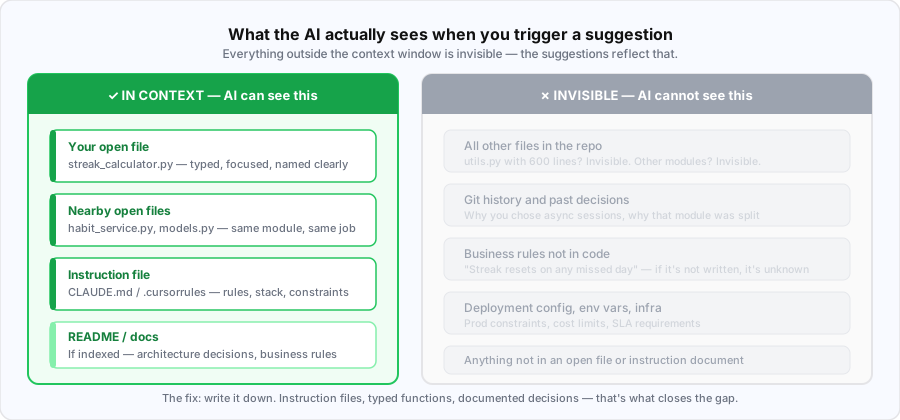
When you trigger a suggestion, the AI reads your open file, a few nearby files, and any instruction file you’ve set up. That’s it. Everything else is invisible.
If that slice is a file called utils.py with untyped functions, you get generic code that could belong to any project anywhere. If it has typed functions, a clear module name, and a project briefing — you start getting code that actually fits your codebase.
Everything below is just about making that slice more useful.
1. Write an instruction file
Every major AI coding tool has one. Copilot reads .github/copilot-instructions.md. Claude reads CLAUDE.md. Cursor reads .cursorrules. Different names, same idea — write it once and copy it across.
Think of it as a briefing for someone who starts fresh every session. What’s the stack? What are the non-negotiable rules? What should they never touch? The more specific you are, the more the AI actually follows it.
“Write clean code” does nothing. The AI just defaults to whatever’s most common on the internet. “SQLAlchemy async sessions only, never sync” — that gets applied straight away. Specificity is the whole point.
Here’s what it looks like for a FastAPI project:
# What this project is
Habit-tracking API. Users log daily check-ins, track streaks.
Free tier: 5 habits. Pro: unlimited + nightly analytics.

## Stack
Python 3.12, FastAPI, SQLAlchemy 2.0 (async), PostgreSQL, Alembic
Auth: JWT via python-jose. Tests: pytest + httpx.

## Rules — specific, non-negotiable
- Type hints on every function — args and return type. No exceptions.
- Docstrings on every public function (Google style).
- SQLAlchemy async sessions only. Never sync.
- Pydantic v2 for all request/response schemas.
- Never bare `except` — always catch specific exceptions.
- One router file per resource: habits.py, users.py, auth.py.
- Services own business logic. Routers handle HTTP only.

## DO NOT touch
- /alembic/versions/ — auto-generated, never edit manually
- Hard-coded secrets — env vars only
This one file does more for suggestion quality than anything else to try. Thirty minutes to write, and it improves every trigger across the entire repo.
2. Break up the god files
A file called streak_calculator.py tells the AI exactly what it’s dealing with. A file called utils.py tells it nothing. And when that utils.py is 600 lines handling streaks, auth helpers, email formatting, and date math — every suggestion in that file is going to be a guess.
One file, one job. Keep them under 200 lines. AI tools have a token budget, so a long file gets truncated — the suggestion near the bottom won’t know what’s at the top. A focused 80-line file gets read in full every time.
In VS Code, renaming is one step: F2 on the module name and all imports update automatically.
# Before
utils.py              # 600 lines, 10 concerns

# After
streak_calculator.py  # 80 lines, one job
habit_service.py      # business logic for habits only
auth_helpers.py       # JWT handling, nothing else
Function names matter too. def handle(d) could mean anything. def calculate_current_streak(check_in_dates) tells the AI what it does, what it takes, and roughly what it returns — before it’s even seen the body.
3. Add types and docstrings
Without type hints, the AI is guessing from the function name alone. With them, it knows the exact shape of every argument and return value — and gets callers right across the whole codebase without you having to explain anything.
Docstrings add the intent on top of the signature. Together they’re what make suggestions feel like they actually fit your project.
def calculate_current_streak(check_in_dates: list[date]) -> int:
    """Calculate the user's current consecutive streak.

    A streak resets if any single day is missed.
    Dates must be sorted ascending. Returns 0 if empty.

    Args:
        check_in_dates: Sorted list of dates the user checked in.

    Returns:
        Number of consecutive days up to and including today.
    """
    ...
After writing that function, Copilot auto-suggested get_longest_streak on the very next line — right signature, right docstring format, right argument name. It saw the pattern and knew what came next. That kind of suggestion only happens when the code gives it enough to work with.
Works the same in any typed language — TypeScript interfaces, Go structs, Java generics. The shape of your data is what the AI reasons from.
4. Commit your editor config
In VS Code, .vscode/settings.json does two useful things for AI quality: it sets type checking strictness (which Pylance feeds to Copilot), and it controls which folders show up in the file tree.
Excluding __pycache__, .venv, and alembic/versions means the AI isn’t wasting its token budget reading bytecode. It’s a small thing but it adds up.
{
  "python.analysis.typeCheckingMode": "strict",
  "python.defaultInterpreterPath": "./.venv/bin/python",
  "[python]": {
    "editor.defaultFormatter": "ms-python.black-formatter",
    "editor.formatOnSave": true
  },
  "github.copilot.enable": {
    "*": true,
    ".env": false
  },
  "files.exclude": {
    "**/__pycache__": true,
    "**/.venv": true,
    "**/alembic/versions": true
  }
}
Also worth committing: .vscode/extensions.json. Every new teammate gets a one-click prompt to install Pylance, Black, Ruff, and Copilot. Without it, everyone sets things up differently and suggestion quality varies for no real reason.
Copilot off on .env is worth doing. The model doesn’t need to be completing your secrets file, and keeping it off there avoids a whole category of accidental exposure.
5. Use the README for decisions, not just setup
Every AI tool indexes the README. Most developers fill it with install steps. That’s fine, but it’s not what improves suggestions.
What actually helps: architecture decisions and business rules — the things that aren’t obvious from reading the code.
“Streak resets if any day is missed” isn’t written anywhere in the code. It lives in someone’s head. Put it in the README and the AI carries it into every suggestion related to streaks. “Free tier cap is enforced in the router, not the UI” shapes every feature that touches tier logic. Two paragraphs of this and a lot of wrong suggestions go away.
## Architecture decisions
- Routers handle HTTP only. Business logic lives in services/.
- All DB sessions are async — SQLAlchemy sync is never used.
- All datetimes stored as UTC. Timezone conversion is frontend-only.

## Business rules
- Streak resets if ANY day is missed — not just consecutive misses.
- Free tier: max 5 habits enforced in the router, not just the UI.
- Check-ins are immutable once submitted — no edit or delete endpoints.
Fifteen minutes. Genuinely worth it.
Starting from scratch
If none of this exists in your repo yet, don’t try to do it all at once. The instruction file alone is worth starting with — it takes 30 minutes and immediately changes suggestions across the entire codebase. After that, add types to whichever functions your AI tool opens most often, and drop an architecture section in the README.
That’s the 80% right there.
None of this is really about AI. Clear module names, type hints, documented decisions, focused files — good engineering teams do all of this anyway. For maintainability, for onboarding, for code reviews.
AI tools just made the cost of skipping it immediate. A poorly documented function used to catch up with you in a code review weeks later. Now it shows up in the next Copilot suggestion.
Honestly, that’s a useful feedback loop.