
Most developers interact with AI the same way every time. Open a tab. Type a question. Hope for a useful answer. Then rewrite most of it anyway.
That’s not using AI. That’s using a slightly smarter search engine.
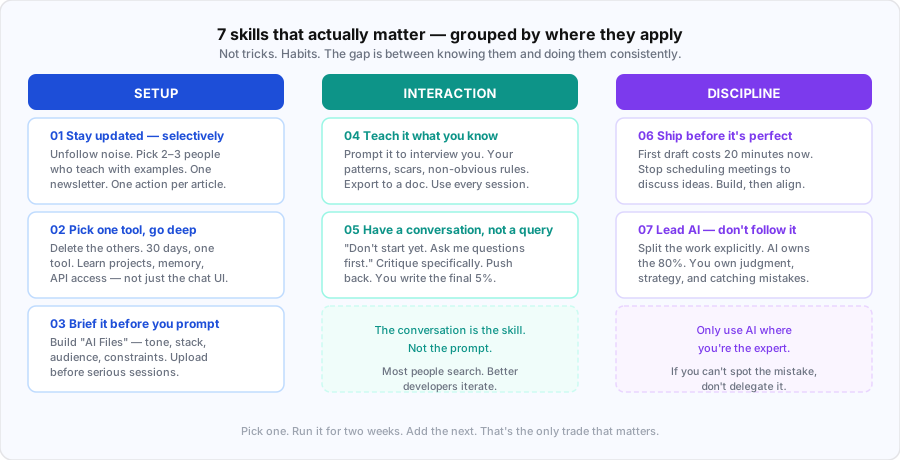
The people getting real leverage from these tools aren’t using better prompts. They’ve built better habits. Here are the seven that actually matter in 2026.

1. Stay Updated With AI News — But Stay Selective
The AI space moves fast enough that what was best practice six months ago is outdated today. But the noise-to-signal ratio is brutal. Following every AI account on the internet will just bury you.
The filter that actually works: unfollow anyone posting AI news without tutorials. News without application is just anxiety. What you want is people who show you how to use the thing, step by step.
Pick two or three creators who teach with concrete examples. Subscribe to one newsletter — not five, one. Read it once a week. And every article you read, try one thing from it immediately. Not tomorrow. Now.
One article, one action. That’s the compounding that matters. The developer who runs one experiment a week from what they read will outpace the one who just stays “informed.”
2. Pick One Tool and Master It
Tool paralysis is real. ChatGPT, Claude, Gemini, Copilot, Cursor, Perplexity — the list grows every quarter. Most developers bounce between them, never going deep on any.
Depth beats breadth every single time.
Pick the AI tool you already reach for most often. Delete every other one from your bookmarks. Commit to just that tool for 30 days. Then actually learn it — not just the chat interface, but everything: projects, memory, thinking modes, file uploads, system prompts, API access.
Most people use 10% of what their primary AI tool can do. The features that save the most time are usually the least obvious ones — and you only find them by going deep, not wide.
At the end of 30 days, you’ll have a tool that knows your work, your style, and your common tasks. That’s a significantly different experience from starting cold every session.
3. Set Up Your AI Before You Prompt
This is the one most developers skip entirely, and it’s why their suggestions feel generic.
AI starts every conversation knowing nothing about you. No context about your stack, your constraints, your audience, your preferences. So it defaults to the average of everything it’s seen — which is rarely what you need.
The fix is straightforward. Create a folder called “AI Files.” Start filling it with documents about you: who you are, what you work on, your tone, your audience, the rules you never break. Add a copywriting playbook. Add examples of output you actually liked. Add a doc of constraints — things you never want suggested.
Before any serious session, upload the relevant files and define the task clearly. You’re not prompting anymore. You’re briefing a collaborator who’s read your handbook.
The difference in output quality is significant. AI went from reading a sticky note to reading a book. Feed it the book.
4. Teach AI What You Know
Here’s what AI doesn’t have: your specific experience. The patterns you’ve noticed across three years on a project. The mistakes you’ve made and won’t repeat. The non-obvious constraints that aren’t written anywhere. The instincts you’ve built from actually shipping things.
That knowledge is the asset AI will never have on its own — but you can give it.
The approach: open your AI tool and prompt it to interview you. Start with: “Ask me questions about my expertise, one by one.” Answer honestly. Let it surface the things you know but rarely articulate — your rules, your scars, what’s worked and what hasn’t.
Then ask it to help you extract your audience: their fears, their objections, the questions they’re too embarrassed to ask, the things they need but don’t say. Export everything into a single document. Standards. Constraints. Audience. Landmines.
Your taste is something AI can learn from but never replicate. Document it, and you’ve given every future session a foundation that makes generic outputs impossible.
5. Talk to AI Like a Colleague, Not a Search Engine
The biggest shift in how you use AI isn’t about prompts. It’s about conversation.
Most people type a question, get an answer, accept or reject it, and move on. That’s a search engine workflow. The better workflow is a back-and-forth with someone whose job is to help you think.
Start sessions differently. Instead of “write me X,” try: “Don’t start yet. Ask me questions first.” Let it gather context before it writes anything. The output after five questions is almost always better than the output after zero.
When you get a first draft, don’t just accept or reject it — critique it specifically. “Too generic.” “Wrong angle.” “Missing the constraint about Y.” Then push harder: “What did you leave out?” “Argue against this.” “What’s the strongest counterargument?”
AI rewrites. You write the final 5%. That 5% is your judgment, your voice, your specific knowledge. The goal isn’t to hand everything to the AI — it’s to compress the 95% that’s mechanical so you can focus entirely on the 5% that actually requires you.
The conversation is the skill. Learn to have it properly.
6. Ship Before It’s Perfect
There’s a meeting happening right now where a team is discussing whether to build something. It will last 45 minutes. At the end, someone will say “let’s align on this offline” and schedule a follow-up.
Alternatively: open an AI tool, describe the idea, have a rough draft in 20 minutes, show it to the same group. Now everyone’s reacting to something real instead of arguing about something abstract.
AI has made “build first, align second” genuinely practical. The cost of a first draft is now 20 minutes, not a week. Which means the old argument for planning before building — that the cost of getting it wrong was too high — has changed significantly.
Stop scheduling meetings to discuss ideas. Build the rough draft first. Let people react to something concrete. The feedback you get on a real artifact is qualitatively better than the feedback you get on a description of a future artifact.
Ship the draft. Refine it based on real reactions. Repeat.
7. Lead AI, Don’t Follow It
This is the one that separates developers who get consistent results from those who get occasional useful outputs and a lot of frustration.
Before any task, split it explicitly: what does AI do, what do you do? Most tasks have a natural split. AI handles the 80% — the execution, the formatting, the first drafts, the boilerplate, the research synthesis. You own the 20% — the strategy, the judgment calls, the voice, the final edit, and most importantly, spotting when it’s wrong.
That last part is critical. Only use AI where you’re the expert. If you can’t spot the mistake, don’t delegate it. AI is confidently wrong with the same tone it uses when it’s confidently right. The only way to catch the errors is to know the domain well enough to see them.
AI is a mirror. It reflects what you bring to it. If you bring shallow questions, vague context, and passive acceptance of outputs, you’ll get shallow results. If you bring deep expertise, specific context, and critical review, you’ll get something that actually extends what you’re capable of.
The developers winning with AI aren’t the ones who’ve handed off the most work. They’re the ones who’ve stayed the most deliberate about what they keep.
These seven aren’t tricks. They’re habits. And like most habits, the gap between knowing them and doing them consistently is where most people get stuck.
Pick one. Run it for two weeks. Then add the next.
That’s the only trade that matters.